Phone Cleaner Changes
Phone Cleaner (com.clearner.mobilecleaner.filemanager.cloud.savevideo.file.photo) was suspended under the Deceptive Behavior policy, Misleading Claims. We accepted the finding, audited our whole listing against it, and corrected everything we found. This page is the evidence: what changed, and the screen in our app behind every claim we still make.
Humble Request to Google Review Team
We are a small, new developer team, and we are writing to ask for your help rather than to dispute your decision. We have corrected everything in our listing that we were able to identify ourselves, and we would be grateful for your guidance on anything we have missed.
Subject: Request for specific guidance - Phone Cleaner
(com.clearner.mobilecleaner.filemanager.cloud.savevideo.file.photo) - appeal 4-4853000042138

Dear Google Play Review Team,

Both replies we have received carry the same text, so we are worried that
the corrections we sent were never actually seen. Before this case is
closed, may we ask you to open one link and look at what we have changed:

https://zaeem-ahmad-growth.github.io/Phone-Cleaner-Cell-Cave/

On that page you will see our old listing and the corrected one side by
side, and each claim we make next to the app screen that shows it. Please
do give it a few minutes of your time.

Your notice says that a suspension counts as a strike against the good
standing of our developer account. That is why we are asking rather than
disputing. We are a new account and a small team, and this app is many
months of our work; a strike left standing this early puts every other app
on this account at risk. Publishing again under a new package name would
leave that strike standing, which is why we would so much rather put this
one right.

We are not asking you to overlook anything. If the corrected listing now
meets the policy, we would be very grateful to have this package reinstated
rather than republished. If it does not, one line would be enough: which
element is at fault - title, short description, full description, icon,
screenshot or feature graphic - and what it should say. Or, if a feature we
describe is held to be functionally impossible, which one.

We will do whatever you ask, however much work it takes.

Kind regards,
Cell Cave
- That this package may be reinstated with the corrected listing in section 4, rather than our publishing the app again under a different package name.
- If something still falls short, that we might be told which element is at fault — and what it would need to say instead.
- If any feature we describe is held to be functionally impossible, that we might know which one, so we can correct it or remove it.
A single sentence on any of these would be enough for us, and we will do whatever you ask, however much work it takes.
- The finding was about our store listing, and we have corrected it. A new package would carry the same app and the same metadata, so nothing would actually be put right by the move.
- We would rather repair this where it went wrong than publish around it.
- A new package would leave the suspension unresolved on our account. We would prefer to close it properly, for your records and ours.
Store graphics, before and after
What we found when we audited our own store art, and what each asset looks like now. The middle frame in every row is the screen in our app that the asset claims to show.
Issues Identified
| Asset | Verdict | The problem | What we did |
|---|---|---|---|
| Screenshot 3 · "Remove Junk With AI" | Critical | 387.7 GB cleaned on a 27.5 GB device, a 96% → 8% drop, "3.2 Hours" saved. | Rebuilt on the app's real result screen; before/after and time-saved removed. |
| Screenshot 1 · "Phone Storage Cleaner" | Critical | "85 % Used" beside "5.0 GB of 27.5 GB", which is 18%. | Recaptured at the device's real 18%. |
| Screenshot 2 · "Delete Duplicate Items" | High | Header, button and saving did not reconcile. | Recaptured: 139 of 288 photos, 600 MB. |
| Feature graphic | Medium | A name the listing never used. All three claims are real. | Rebuilt with the app's own name; callouts unchanged. |
| Icon | Low–medium | The shield badge reads as security software, which this app is not. | Unchanged; the corrected listing makes no security claim. |
| Screenshot 4 · "App Manager" | Acceptable | Placeholder app names; the feature itself is genuine. | Kept. Names stay placeholders, so no other brand appears. |
| Screenshot 5 · "Helpful Tools" | Good | None — a real capture of the real screen. | Kept unchanged. The standard the other four were rebuilt to. |
Screenshot 1 · Storage
- The ring read 85 % Used beside 5.0 GB of 27.5 GB, which is 18.2%. Only the percentage had been altered; the GB figures were the real ones.
- Recaptured from the submitted build at the device's real 18%, so the ring and the GB figures now agree.
- The largest-files list below it now shows real files at real sizes.
Screenshot 3 · Junk cleaning result
- 387.7 GB on a 27.5 GB device — 14.1× the whole phone. Our app's real result screen reports 16.9 MB moved to the bin.
- The 96% → 8% before-and-after and the "3.2 Hours" saved were both removed entirely: no screen produces the first, and the app has no clock to measure the second.
- Rebuilt on the app's real AI Assistant result screen, reporting an amount and a file count the app actually produces.
Screenshot 2 · Duplicate photos
- The header read 235 photos / 2.4GB while the button offered to delete 147 of them and save that same 2.4 GB. The totals could not both be right.
- Recaptured: 139 duplicates out of 288 photos, saving 600 MB — one copy kept per set, which is what the app does.
- The grouping label now reads "Identical copies · keep one", word for word as the app shows it.
Screenshots 4 and 5 · App Manager and Helpful Tools
- App Manager matches the build: apps listed with sizes, multi-select, uninstall. The app names are deliberate placeholders, so no other company's brand or icon appears in our listing.
- Helpful Tools is a real capture: six tiles are word-for-word identical to the build and the other two sit below the fold of the capture.
- Neither needed a change, and neither was changed.
Feature graphic
- The defect was the name on the artwork, not the claims: it read as a different app from the one being advertised.
- Large Files, Duplicate Photos and the Private Vault are all shipped, each captured below.
- Rebuilt with the app's own name; callouts unchanged; no figure, percentage, badge or price added.
The suspended listing and the corrected one, field by field
Every correction we made, and nothing else. Claims that were already accurate are proved against the app in section 5.
| Field | Suspended listing | Corrected listing | Action |
|---|---|---|---|
| Title | Phone Cleaner: Free Up Space | Phone Cleaner: Junk & Photos | Changed |
| Short description | Junk cleaner to remove duplicate photos, clear app cache & free up space. | Junk cleaner for duplicate photos, large files, app cache & storage space. | Changed |
| "Social Media Folder Cleanup" | A whole block describing messenger and social-folder cleanup | Removed in full. Those folders are cleaned within general cleanup; we do not ship it as a feature. | Removed |
| "Duplicate audio tracks" | Listed among the media the app removes | Removed. The app does not do this. | Removed |
| Self-asserted compliance | Two sentences stating the app follows developer policy and avoids false claims | Both deleted. The screens make the argument instead. | Removed |
| "Compare photos side-by-side" | Described a side-by-side comparison | "Preview every copy before anything is deleted" — what the screen does | Reworded |
| "Obsolete APK files, temporary logs" | An itemised breakdown the screen does not show | "Cache and residual files" | Reworded |
| Ads and subscription | Not mentioned anywhere | Stated plainly: ad-supported, with an optional subscription that removes ads | Added |
| Recycle Bin | Not stated | Stated, including that space counts as reclaimed only once the bin is emptied | Added |
| Nine languages | Not claimed | Stated, with the two right-to-left layouts | Added |
| Screenshots | Three of five carried figures the app does not produce, including one larger than the device's total storage | All five replaced with captures from the submitted build — section 2 | Replaced |
| Feature graphic | Carried a name the listing never used | Rebuilt with the app's own name; the three feature callouts are unchanged and all shipped | Replaced |
Our corrected, policy-compliant metadata
This is the listing we will apply on reinstatement. Every claim in it maps to a screen in section 5.
Full description
- Privacy policy: cellcave.github.io/apps/phone-cleaner/privacy/
- App specification, screenshots and store graphics: App Details
Every claim, beside the screen that performs it
Captured from our build on LD Player (Android 9, 720×1280, 320 dpi), 17 Sep 2026. Tap any screen to enlarge.
A · Title and short description
- Home reads real device storage through StatFs — 5.0 GB of 27.5 GB, not an invented figure.
- Junk Clean moves the bytes it reports: the result equals the figure on the button, 14.4 MB.
- 18 tools in the grid, every one opened in QA with no crash.
B · Junk, cache and safe deletion
- With read-only access Junk Clean finds exactly the app cache; with full access it completes the scan and moves 16.9 MB to the Recycle Bin.
- The Clean button announces the ad before it plays.
- AI Analyzer reports 121.5 MB reclaimable — the largest figure our app has produced.
- Reworded: "obsolete APK files, temporary logs" → "cache and residual files".
- Every deletion goes to the bin with a 7-day restore window.
- A restored file was verified byte-identical by SHA-256 on the device.
- Each item carries its own permanent-delete control.
C · Duplicate photos and large media
- 25 duplicate sets · 54 photos, grouped as "Identical copies · keep one".
- The detected files are named Screenshot_2026… — duplicates and screenshots in one capture.
- Per-file thumbnail, size and checkbox; deletion is confirmed before it runs.
- Reworded: "side-by-side" → "preview every copy before anything is deleted".
- Large Files found a 60 MB file and moved it to the Recycle Bin.
- The same file heads the Storage screen's "Largest files" list at 60.0 MB.
- Screen recordings work in the build; the test device held none, so no capture exists.
- Removed: "duplicate audio tracks" — our app does not do this.
D · App manager, storage analyzer and file manager
- App Manager lists 12 installed apps with sizes and carries an "unused" filter.
- Storage: ring at 18% used, 5.0 GB of 27.5 GB, Videos 15.2 MB, Photos 11.4 MB, largest files listed.
- File Manager browses internal storage directly.
- SD-card scanning works in the build; the test device had no card attached.
E · Social Media Folder Cleanup — removed
- No messenger or social tool exists among our 18 tools, and no such screen was captured.
- Those folders are cleaned within general cleanup, but we described it as a feature, and it is not one.
- The whole block was removed rather than softened.
exists
F · Privacy and on-device processing
- Privacy & Security runs a permission-risk audit and a clipboard cleaner.
- AI Assistant is on-device; the build contains no upload path for user files.
- Ad consent can be reopened from the Me tab at any time.
- Private Vault locks files behind a PIN or biometrics.
G · The claims this category usually fakes, and we do not
- No fake memory boost. Phone Boost's own copy tells the user that Android reclaims memory itself.
- No invented numbers. CPU Cooler reports real temperature; System Monitor shows RAM 1.2 of 5.8 GB and storage 5.0 of 27.5 GB.
- No deceptive monetization. The paywall sells only "No ads", with the plans shown before Continue.
- We still removed both sentences that asserted our own compliance — these screens make the point instead.
H · Ten features we ship that the listing never claimed
Deceptive Behavior is about a listing that promises more than the app delivers. On these ten, ours did the opposite.
Summary
| Listing block | Claims | Proved | Reworded | Removed |
|---|---|---|---|---|
| Title and short description | 5 | 5 | 0 | 0 |
| Junk cleaner & residual files | 3 | 2 | 1 | 0 |
| Duplicate photos & media | 3 | 1 | 2 | 0 |
| Cache cleaner & app manager | 3 | 3 | 0 | 0 |
| Storage analyzer & file manager | 3 | 2 | 1 | 0 |
| Social media folder cleanup | 2 | 0 | 0 | 2 |
| Privacy & on-device processing | 2 | 2 | 0 | 0 |
| Why choose / key highlights | 2 | 0 | 2 | 0 |
| Total | 23 | 15 | 6 | 2 |
The notice, our appeal, and Google's response
The correspondence this page answers, for anyone who needs it.
Hello,

Thank you for the review and for naming the area.

We respect the Deceptive Behavior policy and have checked our whole listing
against it, correcting what fell short.

We cannot edit a suspended app in the Console, so our revised listing and
screenshots are here:
https://drive.google.com/drive/folders/1ozf395lEoOyuMO35Ljb2CVx-haTaS8XM?usp=sharing

What changed:
- Title is now "Phone Cleaner: Junk & Photos". Existing title "Free Up Space" described
  reclaiming existing storage, not adding capacity, but we removed it.
- Removed "Social Media Folder Cleanup". Those folders are cleaned within
  general cleanup, never as a feature. Duplicate audio is not handled.
- Removed claims about our compliance.
- Stated that the app is ad-supported.
- Replaced all screenshots with App's UI captures from the submitted build.

Every remaining claim matches a feature in the app. We will apply this on
reinstatement and will gladly make any further change you need.

Please tell us if you need anything else.
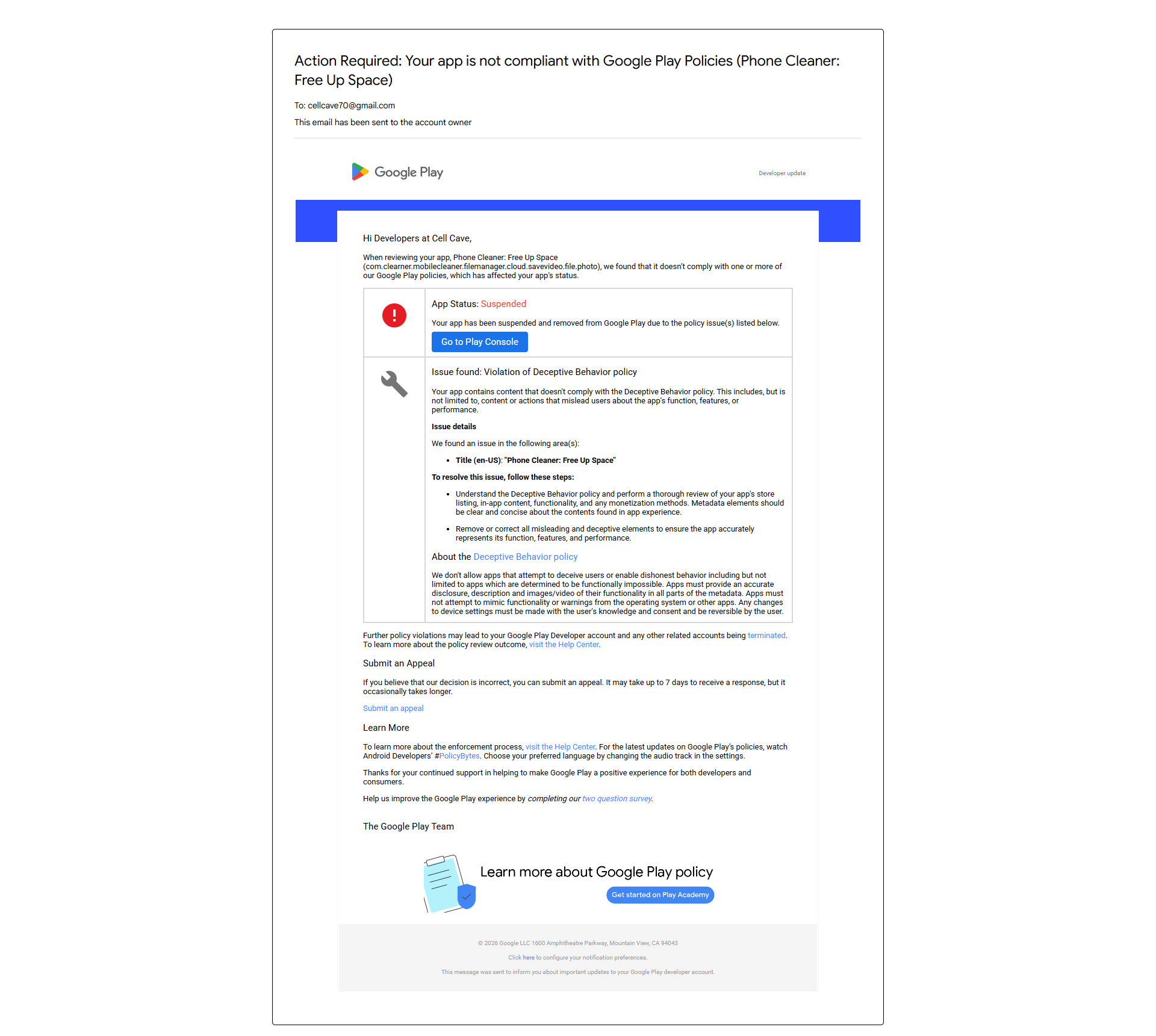 Suspension notice — open the full screenshot
Google Play, 7 Oct 2026 · area found: Title (en-US) · opens in a new tab
Suspension notice — open the full screenshot
Google Play, 7 Oct 2026 · area found: Title (en-US) · opens in a new tab
The policy text Google quoted
The suspension notice and the response to our appeal open with the same sentence. It is quoted once here, with what each message added after it.
We don't allow apps that attempt to deceive users or enable dishonest behavior including but not limited to apps which are determined to be functionally impossible. Quoted in both the suspension email of 7 Oct 2026 and the response to our appeal
Apps must provide an accurate disclosure, description and images/video of their functionality in all parts of the metadata. Apps must not attempt to mimic functionality or warnings from the operating system or other apps. Any changes to device settings must be made with the user's knowledge and consent and be reversible by the user. 7 Oct 2026
We treated accurate disclosure “in all parts of the metadata” as the sentence that applies, and audited every field against it rather than the title alone.
During review, we found that your app violates the Misleading Claims of Deceptive Behavior policy: […] We don't allow apps that contain false or misleading information or claims, including in the description, title, icon, and screenshots. Apps that advertise a certain functionality in their title must provide the user with that functionality. […] marks the sentence quoted above
Our corrected title, Phone Cleaner: Junk & Photos, names only the two screens the app opens on — both proved in section 5.
Policy sources. Google Play Console Help: Deceptive Behavior (17006354, 9888077), Store listing and promotion (9898842), store-listing best practice (13393723), All files access (10467955), enforcement process (9899234), appeals (2477981). All read 7 Oct 2026. Policy quotations were captured through text extraction and are near-verbatim.
App evidence. Our QA round of 17 Sep 2026 on LD Player, Android 9, 360×640 dp. The app screenshots on this page are that round's captures, from the real build. The submitted APK is later than that build, so anything sent to Google as evidence is recaptured from the submitted APK first.
Contact. Cell Cave · privacy policy. This page is maintained by the developer and is published for the Google Play review team.